Step-by-step implementation of Spring Boot microservices on AWS
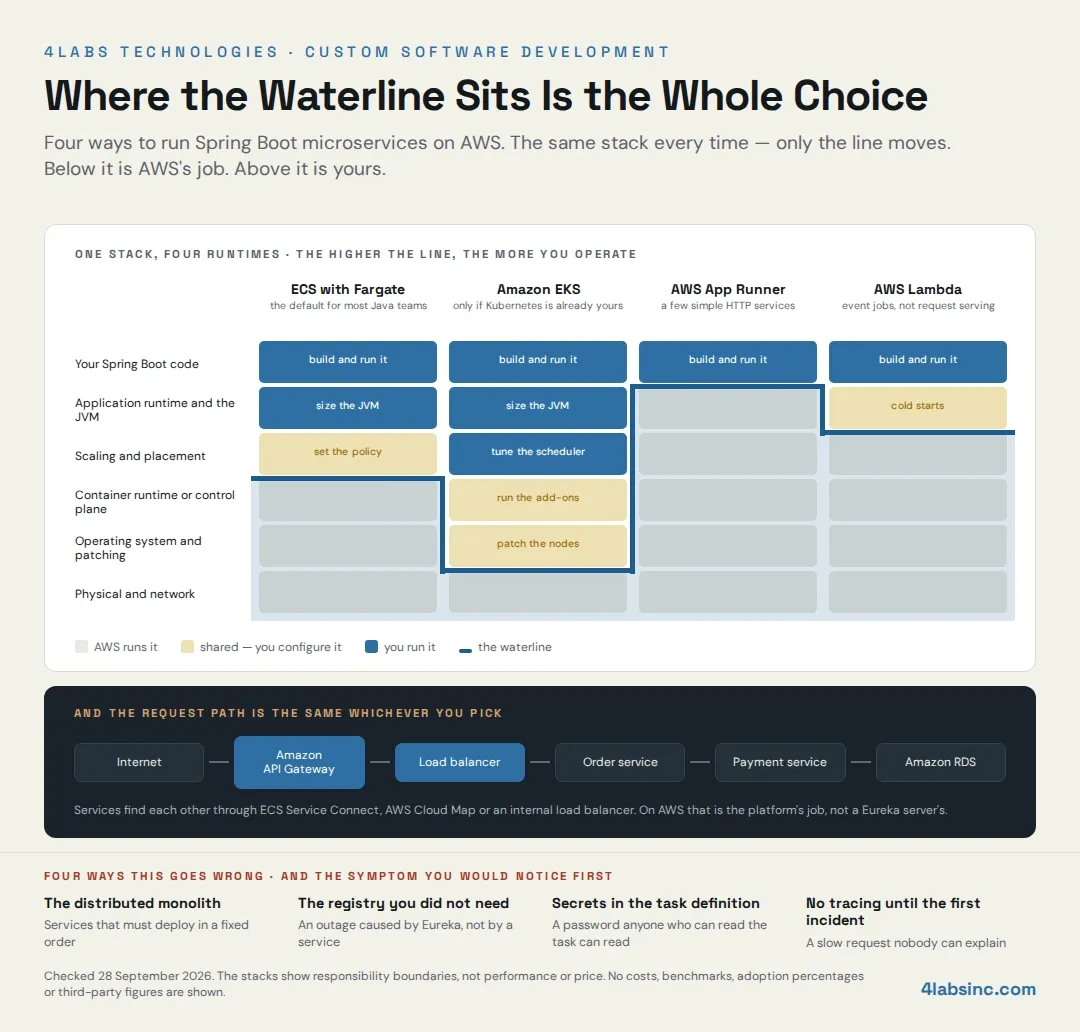
Ten steps, in the order a delivery team actually does them. Each one names the decision inside it and the failure it prevents. The runtime here is ECS with Fargate, for the reasons above.
Step 1: Set up the development environment and project structure
Install a supported long-term-support Java release, and Maven or Gradle. Pin the version in the build so every machine and the pipeline agree.
The decision in this step is repository layout. One repository per service gives each team a clean release cadence and makes ownership obvious. A single repository holding all services is easier to start and easier to keep consistent, and it quietly encourages coupling, because sharing a class across services is one import away.
For a first delivery of three or four services with one team, a single repository is usually the faster route, and you split it when a second team arrives. The failure this avoids is spending week one on repository policy instead of on the first service.
The team shape matters as much as the layout. If you are short of engineers who have run Java on AWS before, that gap is worth closing before the platform work starts rather than during it, which is one reason clients hire cloud and backend developers for the first increment and take it in-house afterwards.
Step 2: Build the services with Spring Boot and Spring Data JPA
Start each service from Spring Initializr with web, Actuator, Spring Data JPA and a database driver. Write the domain logic and the REST controllers as you would in any Spring Boot application.
The decision here is the service boundary, and it is the most consequential one on this page. Draw boundaries around business capabilities that own their own data, so an order service owns orders and a user service owns users. If two services need to write the same table, they are one service.
Give every service its own schema from day one, even if the schemas share an instance at the start. Splitting a database later means splitting queries that have quietly become joins across what should have been a boundary, and that is a rewrite rather than a refactor.
Add Actuator's health and readiness endpoints now, because Step 6 will need them.
Step 3: Containerise each service with Docker
Each service gets a Dockerfile. Three things matter and most examples get at least one wrong.
Use a current, supported base image. Older Spring Boot material, including the version currently published on this page, uses a Java 8 Alpine image that is long out of support. An unsupported base image is an unpatched base image.
Use a layered build so dependencies and application code land in separate layers. Rebuilds then push a small layer instead of the whole jar, which shortens every deployment for the life of the service.
Run as a non-root user. It costs one line and it is the first thing a security review asks about.
Build the image once and promote that exact image through environments. Rebuilding per environment means the artefact you tested is not the artefact you shipped.
Step 4: Push Docker images to Amazon ECR
Create a repository per service in Amazon ECR, in the same region as the compute, and push from the pipeline rather than from anyone's laptop.
Tag with the commit identifier, not with latest. A moving tag makes it impossible to say what is running or to roll back with confidence. Turn on scanning on push, so a known vulnerability in a dependency surfaces at build time instead of in an audit.
Set a lifecycle policy to expire old images, because registries grow quietly and nobody notices until someone reads the bill.
Step 5: Build the AWS network and IAM foundation
This step has no visible output, which is why it gets rushed, and it is the one that is most painful to redo.
Create a VPC with private subnets for the services and public subnets only for the load balancer, and services should have no route in from the internet. Use security groups as the boundary between services, so each one accepts traffic only from what legitimately calls it.
Give every service its own IAM task role with the narrowest permissions it needs. One shared role across all services means every service can read every secret, and the first incident becomes a much bigger incident. The wider version of this argument is in our note on cloud security best practices.
Write all of this as infrastructure as code from the start, whether that is CloudFormation, the CDK or Terraform. Clicking it once in the console means nobody can rebuild it, and nobody can review a change to it.
If your team is standing up an AWS landing zone rather than adding to an existing one, that is a piece of work in its own right, and our IT infrastructure services team does exactly this alongside the application build.
Step 6: Define ECS task definitions and run services on Fargate
A task definition is the contract between your image and the platform: image, CPU, memory, environment, log configuration, and the health check.
Start each service with modest CPU and memory and adjust from observed usage. A JVM sized on a guess is either wasting money or being killed under load, and both are avoidable once you have a week of metrics.
Point the container health check at Actuator's readiness endpoint, not at the root path. A service that is up but not ready, still loading configuration or warming a connection pool, should not receive traffic. This is the single most common cause of errors on deployment, and this one line prevents it.
Set the desired count to at least two tasks for anything users touch. One task means every deployment is an outage and every failure is an outage.
Step 7: Put a load balancer and Amazon API Gateway in front
An Application Load Balancer sits in front of the services, in the public subnets, with the services private behind it. It routes by path or host, checks health, and stops sending traffic to tasks that fail.
Amazon API Gateway goes in front of that when you need what it offers: authentication and authorisation at the edge, rate limiting per client, request validation, usage plans for external consumers. If you need none of those, the load balancer alone is enough, and adding a gateway for its own sake adds a hop and a bill.
The rule of thumb: API Gateway for traffic from outside, load balancer or Service Connect for traffic between your own services.
Terminate TLS at the edge and use a certificate from AWS Certificate Manager. Renewal then takes care of itself, which removes one of the more embarrassing causes of downtime.
Step 8: Wire configuration and secrets with Parameter Store and Secrets Manager
The step most guides skip, and the one that shows up in a security review.
Non-secret configuration goes in AWS Systems Manager Parameter Store. Database credentials, API keys and anything else you would not paste into a ticket go in AWS Secrets Manager. ECS injects both into the container at start, so the application reads them as environment variables or through Spring's own configuration mechanisms, and nothing sensitive is in the image or in the task definition.
Three rules that follow from this.
Never put a secret in an environment variable written into the task definition. It is visible to anyone who can describe the task, and it ends up in version control the day someone commits the infrastructure code.
Never bake configuration into the image. The same image must run in every environment, and only its configuration changes.
Rotate database credentials through Secrets Manager rather than by hand. Manual rotation is a task nobody schedules, so it does not happen.
Where this intersects with compliance or a wider security posture, our cybersecurity consulting team reviews it as part of the build rather than after it.
Step 9: Build the CI/CD pipeline with AWS CodePipeline
One pipeline per service, so services deploy independently. That independence is the point of the architecture, and a shared pipeline removes it.
AWS CodePipeline orchestrates, CodeBuild builds and tests, CodeDeploy handles the release to ECS. Stages: build the image, run the tests, scan the image, push to ECR, deploy to a non-production environment, run the checks, deploy to production.
Use blue/green deployment on ECS. New tasks start alongside the old ones, the load balancer shifts traffic across, and if the health checks fail the shift reverses. The rollback is automatic and it happens in seconds, which is what lets a team deploy on a Thursday afternoon.
The test stage is where this pipeline earns its keep. Unit tests, contract tests between services, and a smoke test against the deployed environment. Contract tests are the ones people leave out and the ones that catch the breakage that matters, because a change in one service's response shape breaks another service silently otherwise. Where that test layer needs building properly, our software testing services team does this alongside delivery.
Step 10: Set up CloudWatch monitoring, tracing and auto scaling
CloudWatch monitoring collects the logs and metrics, and that part is close to automatic. The work is deciding what to do with them.
Alarm on what users feel. Error rate, latency at the ninety-fifth percentile, and whether the service has the number of healthy tasks it should.
Do not alarm on CPU alone; a service can be at thirty per cent CPU and completely broken.
Turn on distributed tracing. AWS X-Ray or an OpenTelemetry collector, with a trace identifier propagated across every call. With more than three services, a failure is a chain, and without tracing you find the broken link by reading logs in six places.
Configure auto scaling on a metric that reflects load. Request count per task or latency usually beats CPU for a Spring Boot service, because the JVM's CPU profile does not track user experience closely. Set a sensible minimum so a traffic spike does not arrive at a single task, and a maximum so a runaway loop does not scale into a bill. Our note on building a scalable IT infrastructure covers how to size for growth without buying it all upfront.
Build one dashboard per service showing traffic, errors, latency and task count. If nobody can answer is it healthy in five seconds, the observability is not finished.
What a realistic first increment looks like
Not ten services. One.
Take the single service with the clearest boundary, ideally one that is already annoying to release inside the monolith. Build it, containerise it, give it a pipeline, put it behind the load balancer, wire its configuration, its alarms and its dashboard, and run it in production for a few weeks with real traffic.
What you get is a template. The second service reuses the pipeline, the network, the observability and the conventions, and takes a fraction of the time. What you also get is the honest answer to whether your team enjoys operating this, which no design document can give you.
The common mistake is building six services in parallel before any of them is in production. Six half-finished services share every problem, and nobody has yet learned what the first one would have taught them.