Logo
Logo
ServicesIndustriesCase StudiesBlogsCareersLet's Connect
blue-white-icon
black-image
Logo
ServicesIndustriesCase StudiesBlogsCareersLet's Connect
burger-icon
hamburger
Best practices for securing your website against cyber threats
Blogs/Website Security Best Practices

Website Security Best Practices: 12 Ways Small Businesses Can Stop Cyber Threats

February 2, 2026
Share Now

Table of Contents

  1. 1. Website Security Best Practices
  2. 2. What Is Website Security
  3. 3. Common Website Security Threats
  4. 4. How to Secure a Website
  5. 5. Review Your Website Security
  6. 6. Hire a Cybersecurity Service Provider
  7. 7. Signs You Need Expert Help
  8. 8. Website Security FAQs

Website Security Best Practices: 12 Ways Small Businesses Can Stop Cyber Threats

Most small business owners don't see their website as a target. Hackers do. Automated bots scan the web day and night, looking for old plugins, weak passwords and open doors.
The numbers show how often they find one. In Verizon's 2026 Data Breach Investigations Report, software flaws became the top way attackers get in. They started 31% of all breaches and passed stolen passwords for the first time. For a small business, one unpatched flaw can mean stolen customer data, a defaced homepage or a site Google flags as unsafe.
Securing your website against cyber threats is no longer a job only for big companies. The good news is that you don't need a large IT team to do it well. This guide walks you through 12 website security best practices that fit a small business budget. You'll learn what website security means, which threats matter most, how to secure a website step by step, and when it's time to bring in expert help.

Stay Ahead of Cyber Threats

Get expert insights, security briefings, and the latest innovations in your inbox.

  • Afghanistan+93
  • Albania+355
  • Algeria+213
  • Andorra+376
  • Angola+244
  • Antigua and Barbuda+1268
  • Argentina+54
  • Armenia+374
  • Aruba+297
  • Australia+61
  • Austria+43
  • Azerbaijan+994
  • Bahamas+1242
  • Bahrain+973
  • Bangladesh+880
  • Barbados+1246
  • Belarus+375
  • Belgium+32
  • Belize+501
  • Benin+229
  • Bhutan+975
  • Bolivia+591
  • Bosnia and Herzegovina+387
  • Botswana+267
  • Brazil+55
  • British Indian Ocean Territory+246
  • Brunei+673
  • Bulgaria+359
  • Burkina Faso+226
  • Burundi+257
  • Cambodia+855
  • Cameroon+237
  • Canada+1
  • Cape Verde+238
  • Caribbean Netherlands+599
  • Cayman Islands+1
  • Central African Republic+236
  • Chad+235
  • Chile+56
  • China+86
  • Colombia+57
  • Comoros+269
  • Congo+243
  • Congo+242
  • Costa Rica+506
  • Côte d'Ivoire+225
  • Croatia+385
  • Cuba+53
  • Curaçao+599
  • Cyprus+357
  • Czech Republic+420
  • Denmark+45
  • Djibouti+253
  • Dominica+1767
  • Dominican Republic+1
  • Ecuador+593
  • Egypt+20
  • El Salvador+503
  • Equatorial Guinea+240
  • Eritrea+291
  • Estonia+372
  • Ethiopia+251
  • Faroe Islands+298
  • Fiji+679
  • Finland+358
  • France+33
  • French Guiana+594
  • French Polynesia+689
  • Gabon+241
  • Gambia+220
  • Georgia+995
  • Germany+49
  • Ghana+233
  • Gibraltar+350
  • Greece+30
  • Greenland+299
  • Grenada+1473
  • Guadeloupe+590
  • Guam+1671
  • Guatemala+502
  • Guinea+224
  • Guinea-Bissau+245
  • Guyana+592
  • Haiti+509
  • Honduras+504
  • Hong Kong+852
  • Hungary+36
  • Iceland+354
  • India+91
  • Indonesia+62
  • Iran+98
  • Iraq+964
  • Ireland+353
  • Israel+972
  • Italy+39
  • Jamaica+1876
  • Japan+81
  • Jordan+962
  • Kazakhstan+7
  • Kenya+254
  • Kiribati+686
  • Kosovo+383
  • Kuwait+965
  • Kyrgyzstan+996
  • Laos+856
  • Latvia+371
  • Lebanon+961
  • Lesotho+266
  • Liberia+231
  • Libya+218
  • Liechtenstein+423
  • Lithuania+370
  • Luxembourg+352
  • Macau+853
  • Macedonia+389
  • Madagascar+261
  • Malawi+265
  • Malaysia+60
  • Maldives+960
  • Mali+223
  • Malta+356
  • Marshall Islands+692
  • Martinique+596
  • Mauritania+222
  • Mauritius+230
  • Mayotte+262
  • Mexico+52
  • Micronesia+691
  • Moldova+373
  • Monaco+377
  • Mongolia+976
  • Montenegro+382
  • Morocco+212
  • Mozambique+258
  • Myanmar+95
  • Namibia+264
  • Nauru+674
  • Nepal+977
  • Netherlands+31
  • New Caledonia+687
  • New Zealand+64
  • Nicaragua+505
  • Niger+227
  • Nigeria+234
  • North Korea+850
  • Norway+47
  • Oman+968
  • Pakistan+92
  • Palau+680
  • Palestine+970
  • Panama+507
  • Papua New Guinea+675
  • Paraguay+595
  • Peru+51
  • Philippines+63
  • Poland+48
  • Portugal+351
  • Puerto Rico+1
  • Qatar+974
  • Réunion+262
  • Romania+40
  • Russia+7
  • Rwanda+250
  • Saint Kitts and Nevis+1869
  • Saint Lucia+1758
  • Saint Pierre & Miquelon+508
  • Saint Vincent and the Grenadines+1784
  • Samoa+685
  • San Marino+378
  • São Tomé and Príncipe+239
  • Saudi Arabia+966
  • Senegal+221
  • Serbia+381
  • Seychelles+248
  • Sierra Leone+232
  • Singapore+65
  • Slovakia+421
  • Slovenia+386
  • Solomon Islands+677
  • Somalia+252
  • South Africa+27
  • South Korea+82
  • South Sudan+211
  • Spain+34
  • Sri Lanka+94
  • Sudan+249
  • Suriname+597
  • Swaziland+268
  • Sweden+46
  • Switzerland+41
  • Syria+963
  • Taiwan+886
  • Tajikistan+992
  • Tanzania+255
  • Thailand+66
  • Timor-Leste+670
  • Togo+228
  • Tonga+676
  • Trinidad and Tobago+1868
  • Tunisia+216
  • Turkey+90
  • Turkmenistan+993
  • Tuvalu+688
  • Uganda+256
  • Ukraine+380
  • United Arab Emirates+971
  • United Kingdom+44
  • United States+1
  • Uruguay+598
  • Uzbekistan+998
  • Vanuatu+678
  • Vatican City+39
  • Venezuela+58
  • Vietnam+84
  • Wallis & Futuna+681
  • Yemen+967
  • Zambia+260
  • Zimbabwe+263
Our Services
Digital Marketing
Staff Augmentation
IT Infrastructure
ERP Solutions
Software Development
Web & App Development
Industries
Cryptocurrency and Blockchain
Banking, Financial Services, and Insurance (BFSI)
Lending and FinTech
Oil and Gas
Energy and Utilities
Automotive and Manufacturing
Agriculture
Real Estate
E-commerce and Retail
Case Studies
Financial Services Test Automation
AI-Driven Customer Risk Profiling
Elevating Mobile Performance
Jewelry Client Transformation
AI Underwriting Revolution
Advanced Cybersecurity Solutions
Eyewear Retailer Transformation
Revolutionizing Manufacturing Operations
Offshore Development Excellence
Company

About Us

Careers

Let's Connect

Business Referral

Engagement Model

Partnership Programs

Resources

Blogs

footer1-iconfooter2-iconiso_iconiso_icon2

4labsicon

Copyright © 2026 4Labs Technologies. All Rights Reserved.

Privacy Policy

Terms & Conditions

Accessibility

fb-icon
twitter-icon
instagram-icon
linkedin-icon

Key takeaways
  • Website security protects your site, your data and your visitors from attacks like malware, SQL injection and DDoS.
  • The fixes that matter most are HTTPS, regular updates, multi-factor authentication, a web application firewall, tested backups and constant monitoring.
  • Check your site weekly, audit it every quarter, and test it after every major change.
  • If you take payments or store personal data and have no in-house IT team, a cybersecurity service provider can close the gap.

What Is Website Security?

Website security is the set of tools, habits and processes that protect a website from attacks, data theft and downtime. It keeps your site's data private, stops anyone from changing it without permission, and keeps the site online for real visitors.
Security teams call these three goals confidentiality, integrity and availability. In plain terms, your customers' details stay private, your pages show what you published, and your site loads when people need it. Good website security covers all three. It spans your code, your hosting, your logins and the people who manage the site.

Why Website Security Matters for Small Businesses

Website security for small business owners is about more than tech. It protects revenue, reputation and the search traffic you worked hard to earn.

Small Businesses Are Easy Targets

Many owners assume attackers only chase large brands. The data says otherwise. Verizon's 2025 report found ransomware in 88% of breaches at smaller organizations. Attackers know small firms often lack a security team, so they move on quickly to the easiest door. Most attacks are automated, which means your site gets tested whether anyone knows your name or not.

A Breach Costs More Than Money

The global average cost of a data breach reached a record $4.99 million in 2026, according to IBM's Cost of a Data Breach Report. A small business will usually lose less in dollars, but the damage can hurt more. Recovery work, lost sales, legal fees and customer notices add up fast. Trust is harder to rebuild. A customer whose card data leaks may never come back.

Security Affects Your Search Rankings

Search engines protect their users first. Chrome labels sites without HTTPS as "Not secure," and Google warns people away from sites it finds serving malware. A hacked site can drop out of results, lose organic traffic and take weeks to recover. Strong security protects your SEO as much as your data.

What Are the Most Common Website Security Threats?

The most common website security threats are malware, ransomware, SQL injection, cross-site scripting (XSS) and DDoS attacks. Brute force logins, phishing and flawed third-party plugins round out the list. Knowing how each one works makes it far easier to protect your website from hackers.

ThreatWhat it doesBest defense
Malware and ransomwarePlants harmful code that steals data, spreads to visitors or locks your files until you payUpdates, malware scans, offline backups
SQL injectionSends harmful commands through forms or URLs to read or change your databaseSecure coding, input checks, WAF
Cross-site scripting (XSS)Injects scripts into your pages that run in visitors' browsersOutput encoding, Content Security Policy
Brute force and credential stuffingGuesses passwords or reuses leaked ones to take over accountsMFA, passkeys, login limits
DDoS attacksFloods your server with fake traffic until the site goes downCDN, DDoS protection from your host
Phishing and social engineeringTricks staff into sharing logins through fake emails, texts or callsStaff training, MFA
Plugin and supply chain flawsUses a weak spot in a theme, plugin or vendor tool to get inTrusted vendors, updates, fewer plugins
Malicious botsScrape content, test stolen cards or probe for weak spots at scaleWAF, bot filtering, rate limits

Third-party risk is growing fast. Verizon found that breaches involving a third party rose 60% and now make up 48% of all breaches. Every plugin, widget and vendor login you add is another door to watch.

Not sure which of these threats your site is open to? A short review with a security expert shows you where to start. Talk to a Security Advisor

How to Secure a Website: 12 Best Practices

The practices below run from quick wins to ongoing habits. Start with the "do today" items in the checklist, then work down the list. Each step closes a gap attackers use every day.
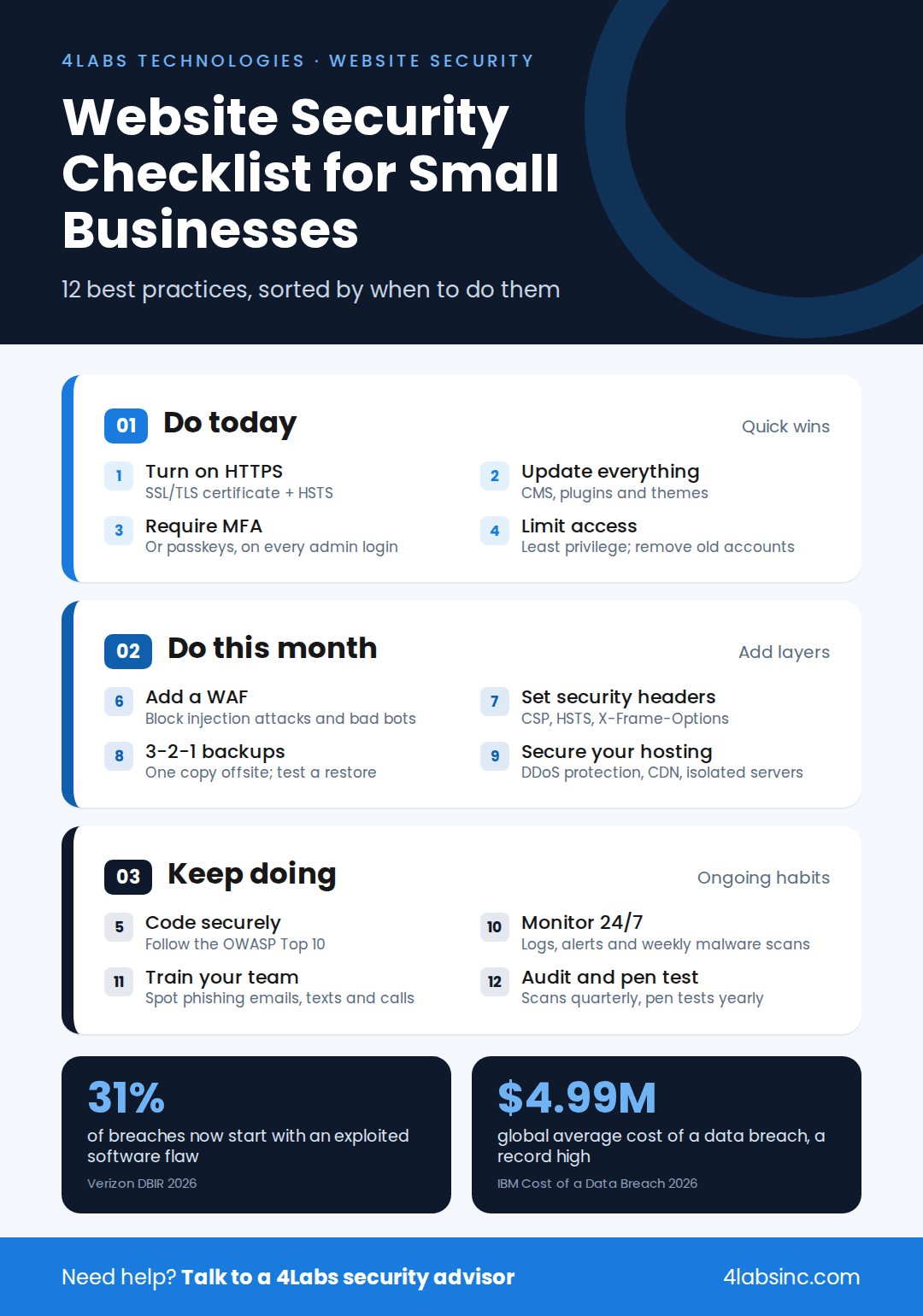
Website security best practices checklist for small businesses in three tiers.png

1. Use HTTPS With an SSL/TLS Certificate
An SSL/TLS certificate encrypts data as it moves between your site and your visitors. It turns HTTP into HTTPS and adds the padlock in the browser bar. Without it, logins, form entries and card details can be read in transit.
Most hosts now offer free certificates, so cost is no excuse. Once HTTPS is live, redirect all HTTP traffic to it. Then turn on HSTS, a setting that tells browsers to always use the secure version of your site.

2. Keep Your CMS, Plugins and Server Software Updated
Outdated software is the easiest way in. When a vendor fixes a flaw, attackers study the patch and go after sites that haven't installed it yet. That's why vulnerability exploitation now tops Verizon's list of breach entry points.
Turn on automatic updates for your CMS, themes and plugins where you can. Check server software and libraries every month. Delete plugins and themes you no longer use, because an inactive plugin can still be exploited. This simple patch management habit blocks a large share of attacks.

3. Turn On MFA and Use Strong Passwords or Passkeys
A stolen password shouldn't be enough to take over your site. Multi-factor authentication (MFA) asks for a second proof, such as a code from an app or a security key. Passkeys go further and replace passwords with a secure sign-in tied to a device.
Require MFA for every admin, editor and hosting account. Ask your team to use a password manager so each login is long and unique. This shuts down credential stuffing, where attackers try passwords leaked from other sites.

4. Give Users Only the Access They Need
Not everyone needs admin rights. The principle of least privilege means each person gets only the access their job requires. A content writer can publish posts without touching plugins or payment settings.
Review user accounts every quarter. Remove former staff and old agency logins right away. This is the core idea behind zero trust: never assume an account is safe just because it's already inside.

5. Build With Secure Coding Practices
Many attacks target flaws in the code itself. Secure coding means checking every input and using safe, parameterized database queries. It also means encoding output before it reaches the page. These steps stop SQL injection and cross-site scripting at the source.
Ask your developers to follow the OWASP Top 10:2025, the standard list of the most serious web app risks. Broken access control sits at number one, followed by security misconfiguration and software supply chain failures. Building a new site? Pick a team that offers secure web application development. The team should also build security testing into the software development lifecycle.

6. Add a Web Application Firewall (WAF)
A web application firewall sits between your site and the internet. It inspects incoming traffic and blocks harmful requests, such as SQL injection attempts and bad bots, before they reach your server.
Many WAFs also offer virtual patching. That means they can block an attack on a known flaw while you wait for the official fix. For a small business, a cloud-based WAF is usually the fastest and most affordable option.

7. Set Up Security Headers
Security headers are short instructions your server sends to the browser. They cost nothing and take little time to add, yet many small business sites skip them.
Start with these four:

  • Content-Security-Policy (CSP) limits which scripts can run, which blocks most XSS attacks.
  • Strict-Transport-Security (HSTS) forces HTTPS on every visit.
  • X-Frame-Options stops other sites from loading yours in a hidden frame.
  • X-Content-Type-Options stops browsers from guessing file types in unsafe ways.
    Test your headers with a free online scanner after each change.

8. Back Up Your Website Using the 3-2-1 Rule
Backups are your safety net when everything else fails. The 3-2-1 rule keeps it simple: hold three copies of your data, on two types of storage, with one copy offsite.
Keep at least one backup offline or locked so ransomware can't reach it. Back up daily if your site changes often. Most important, test a full restore every few months. A backup you've never restored is only a hope.

9. Choose Secure Hosting With DDoS Protection
Your host is the foundation of your website security. A good host patches its servers, isolates each account and blocks DDoS attacks before they reach you.
Ask your provider about firewalls, malware scanning, backups and uptime guarantees. A content delivery network (CDN) adds another layer by spreading traffic across many servers. If your site runs in the cloud, cloud security services help lock down settings that are easy to get wrong. Growing businesses may also need managed IT infrastructure that scales safely.

10. Monitor Traffic, Logs and Malware Around the Clock
You can't stop what you can't see. Monitoring tools watch for odd login attempts, traffic spikes and file changes. Intrusion detection systems flag behavior that looks like an attack in progress.
Set alerts for failed logins, new admin users and changes to core files. Run a malware scan at least weekly. Keep security logs for months, not days, so you can trace what happened after an incident. Larger teams often rely on a security operations center (SOC) to watch alerts 24/7.

11. Train Your Team to Spot Phishing
Technology can't fix every human mistake. One click on a fake login page can hand over the keys to your site. Attackers now use texts and phone calls as well as email. Verizon found that these mobile scams succeed 40% more often than email phishing.
Run short training sessions a few times a year. Teach staff to check sender details, avoid unknown links and report anything odd. Set clear rules for AI tools, too. Staff should never paste passwords, customer data or site code into unapproved apps.

12. Run Regular Security Audits and Penetration Tests
A security audit checks your site against known risks and best practices. A penetration test goes further. An ethical hacker tries to break in, just as a real attacker would, and shows you what they found.
Run a vulnerability assessment every quarter and a penetration test at least once a year. Test again after any redesign, new feature or platform move. Pair these checks with regular IT audits for compliance if you handle payments or health data. Professional security testing services can find flaws that automated scanners miss.

Want to know how your website holds up? Get a website security audit and penetration test from the 4Labs security team. You'll get a clear report and a fix plan ranked by risk. Book a Security Audit


When Should You Review Your Website Security?

Review your website security on a fixed schedule and after every major change. Threats shift every month, so a one-time setup won't keep you safe for long. Use this simple calendar as a guide.

How oftenWhat to check
WeeklyInstall updates, run a malware scan, review failed logins and alerts
MonthlyConfirm backups ran, test one restore, check server software and SSL expiry
QuarterlyReview user accounts, run a vulnerability assessment, update staff training
YearlyRun a full penetration test and a security audit, review your hosting and vendors
After any big changeTest after a redesign, new plugin, new payment tool or platform move

Audits often surface the same issues again and again. Our guide to common IT audit findings shows how to fix them for good.

How to Tell If Your Website Has Been Hacked

Some attacks are loud. Others stay hidden for months. Watch for these warning signs:

  • Your homepage shows content, links or pop-ups you didn't add.
  • Google or your browser shows a "This site may be hacked" or malware warning.
  • Visitors get sent to spam or scam sites.
  • New admin accounts appear that nobody on your team created.
  • Your site slows down or crashes for no clear reason.
  • Your host suspends the account or reports unusual activity.
  • Customers say they got strange emails that seem to come from you.
  • Search results show your site with odd titles in other languages.
    If you notice even one of these, act fast. The longer an attacker stays, the more damage they do.

What to Do If Your Website Is Hacked

A calm, clear incident response plan limits the damage. Follow these six steps in order:

  1. Contain the attack
    Put the site in maintenance mode or take it offline. Tell your host right away.
  2. Change every password
    Reset admin, hosting, database, FTP and email logins. Turn on MFA if it wasn't active.
  3. Find the cause
    Review logs, recent file changes and new user accounts to learn how the attacker got in.
  4. Clean or restore
    Remove harmful code, or restore a clean backup from before the attack. Then patch the flaw that let them in.
  5. Request a review
    If Google flagged your site, ask for a security review in Search Console once it's clean.
  6. Notify and learn
    Tell affected customers if their data was exposed, as local laws require. Then update your plan so it doesn't happen again.

If you can't tell how the attacker got in, bring in an incident response expert. Restoring a backup without closing the hole often leads to a repeat attack.

DIY or Hire a Cybersecurity Service Provider?

Many small businesses can handle the basics on their own. HTTPS, updates, MFA and backups don't need an expert. But as your site grows, so do the risks and the time it takes to manage them. Here's how the two paths compare.

FactorDo it yourselfCybersecurity service provider
Upfront costLow; many tools are free or cheapMonthly or project fee
Your timeSeveral hours a monthA short monthly check-in
Skills neededBasic tech know-howDedicated security specialists
CoverageThe basics you know to checkCode, cloud, network, people and compliance
MonitoringBusiness hours at bestOften 24/7
Response to an attackYou figure it out under pressureA tested plan and a team on call

Most small businesses land on a mix. They handle daily habits in-house. Then they bring in cybersecurity services for small businesses for testing, monitoring and incident response.

Signs You Need Expert Help

It may be time to call in a cybersecurity service provider if:

  • You take online payments or store personal, health or financial data.
  • You have no in-house IT or security staff.
  • You must meet rules such as PCI DSS, HIPAA or GDPR.
  • Your site has been hacked before, or you've seen warning signs.
  • You're launching a new platform, app or major redesign.
  • Your team spends more time fixing security issues than growing the business.

What a Cybersecurity Partner Handles for You

A good partner takes the heavy lifting off your plate. At 4Labs Technologies, our security team supports businesses with:

  • Vulnerability assessment and penetration testing (VAPT) to find weak spots before attackers do.
  • Managed security with 24/7 threat monitoring so alerts get handled at any hour.
  • Application security and DevSecOps so new features ship without new holes.
  • Compliance consulting for frameworks such as ISO 27001, SOC 2, PCI DSS and GDPR.
  • Virtual CISO (vCISO) services that give you senior security guidance without a full-time hire.
  • Incident response retainers so help is ready the moment something goes wrong.

See how this works in practice in our cybersecurity case study for a decentralized provider.

Website Security Best Practices FAQs

How do I secure my small business website?

Start with the basics: install an SSL/TLS certificate, keep your CMS and plugins updated, and turn on MFA for every admin. Then add a web application firewall, set up offsite backups and monitor your site for malware. Review security weekly and test it with an audit at least once a year.

Is an SSL certificate enough to secure my website?

No. An SSL certificate only encrypts data as it travels between your site and your visitors. It doesn't stop malware, weak passwords, outdated plugins or code flaws. Think of HTTPS as one lock on one door. You still need updates, MFA, a firewall, backups and monitoring to protect the rest of your site.

How often should I back up and update my website?

Back up your site daily if it changes often, such as an online store or busy blog. Weekly backups can work for a simple brochure site. Install security updates as soon as they're released, ideally within a few days. Test a full restore every few months to make sure your backups actually work.

How much does website security cost for a small business?

The cost depends on your site's size and risk. Many basics are free or low cost, including SSL certificates, MFA apps and some security plugins. A cloud WAF, managed backups and malware monitoring add a monthly fee. Penetration tests and managed security services are priced by scope, so ask a provider for a quote.

What is the difference between a vulnerability scan and a penetration test?

A vulnerability scan is an automated check that looks for known weak spots, such as outdated software or missing patches. A penetration test is a manual attack run by an ethical hacker. It shows how far a real attacker could get by chaining flaws together. Scans are quick and frequent; penetration tests go deeper and happen less often.

Can AI tools make my website less secure?

Yes, if they're used without rules. Staff may paste passwords, code or customer data into unapproved AI apps. AI-written code can also include hidden flaws. IBM reported a 56% rise in AI-driven attacks in 2026. Set a clear AI use policy, review all AI-generated code, and limit which tools can access your data.

Do small businesses need a cybersecurity service provider?

Not always, but many benefit from one. If you handle payments or personal data, lack in-house IT, or must meet compliance rules, a provider can fill the gap. A cybersecurity service provider offers testing, 24/7 monitoring and fast incident response that are hard to build on your own.

Make Website Security a Habit, Not a One-Time Fix

Website security isn't a box you tick once. It's a routine. Lock the doors first with HTTPS, updates and MFA. Add layers with a firewall, security headers and tested backups. Then keep watch through monitoring, training and regular audits.
Small steps, done often, stop most attacks. Following these website security best practices protects your customers, your revenue and your place in search results.

Protect your website before attackers find the gap. 4Labs Technologies helps small and growing businesses test, monitor and secure their websites, so you can focus on running the business. No commitment required. Talk to a Security Advisor
Need developers who build security in from day one? Hire Security & Web Developers

‹ PreviousNext ›
author_icon
About the Author

Jithesh Rajasekharan

CTO

A technology-focused Chief Technology Officer driving innovation, scalable solutions, and digital transformation. Experienced in leading technical teams, shaping technology strategies, and building reliable solutions aligned with business goals.